Review Training by Month with the traqqer Calendar
Updated July 15, 2026
By the traqqer Editorial Team
Reviewing activities one at a time can hide the larger pattern. traqqer’s calendar provides a monthly view of training density, content, and competition dates.
See Training by Month
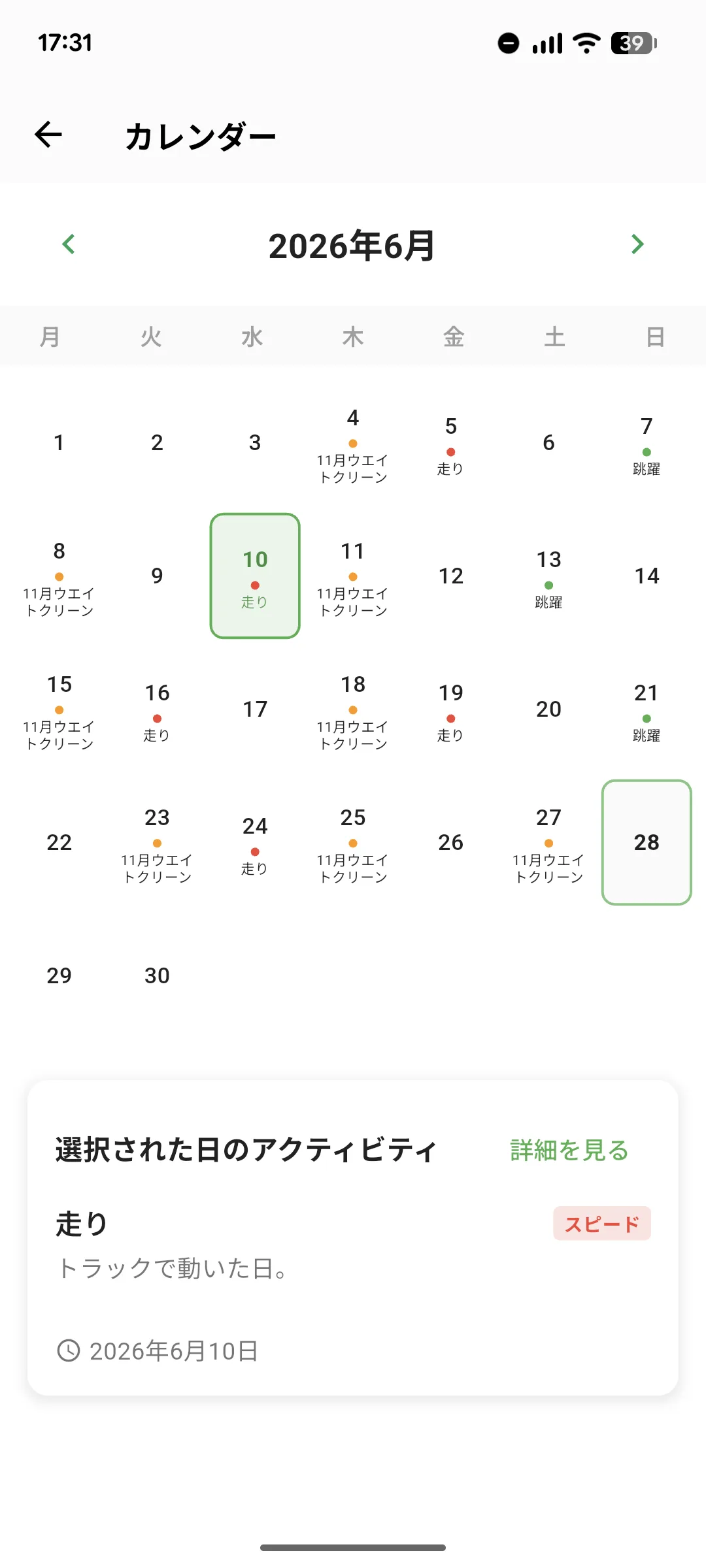
Move between months to see the full set of recorded sessions. A dense week, an unusually light week, or a long break is easier to notice on one page than in an activity feed. Because the rate of change in workload matters, the monthly view also provides useful context for workload trends.
Understand the Category Colors
Each day displays training in the color of its category. You can often recognize a speed, endurance, strength, technique, recovery, or other session without opening it. A long run of one color may reveal an intentional block or an unintended imbalance. See how training categories work.
See Competition Dates
Registered competitions appear alongside training. The calendar shows how much training time remains before the next meet and helps you plan the adjustment toward it. See recording competitions.
Open a Day for Detail
Tap a date to view its activities. The useful pattern is to begin with the overview, notice a period of interest, and then open specific sessions. You can examine what training preceded a strong period or what was happening during a plateau.
Build an Overview Habit
Daily records become more useful when you step back at the end of a week or month. Record, review the period, and apply what you noticed. See how to record a training session for the basic workflow.
Start Your Journey with traqqer
traqqer is an AI-powered app that helps you build better habits.
Download now and transform your daily routines for a better life.
