Use traqqer Quick Entry to Record Training and Plan Future Sessions
Updated July 15, 2026
By the traqqer Editorial Team
Training journals often fail because entering a session takes too much effort. traqqer’s Quick Entry reduces that work by letting you save a menu from the calendar. A future date turns the same flow into a plan.
Record from the Calendar
Choose a date, select a workout, and save it. You do not have to complete every detailed field immediately; condition and longer notes can be added later. The purpose is to prevent a completed session from disappearing simply because a full entry felt too demanding.
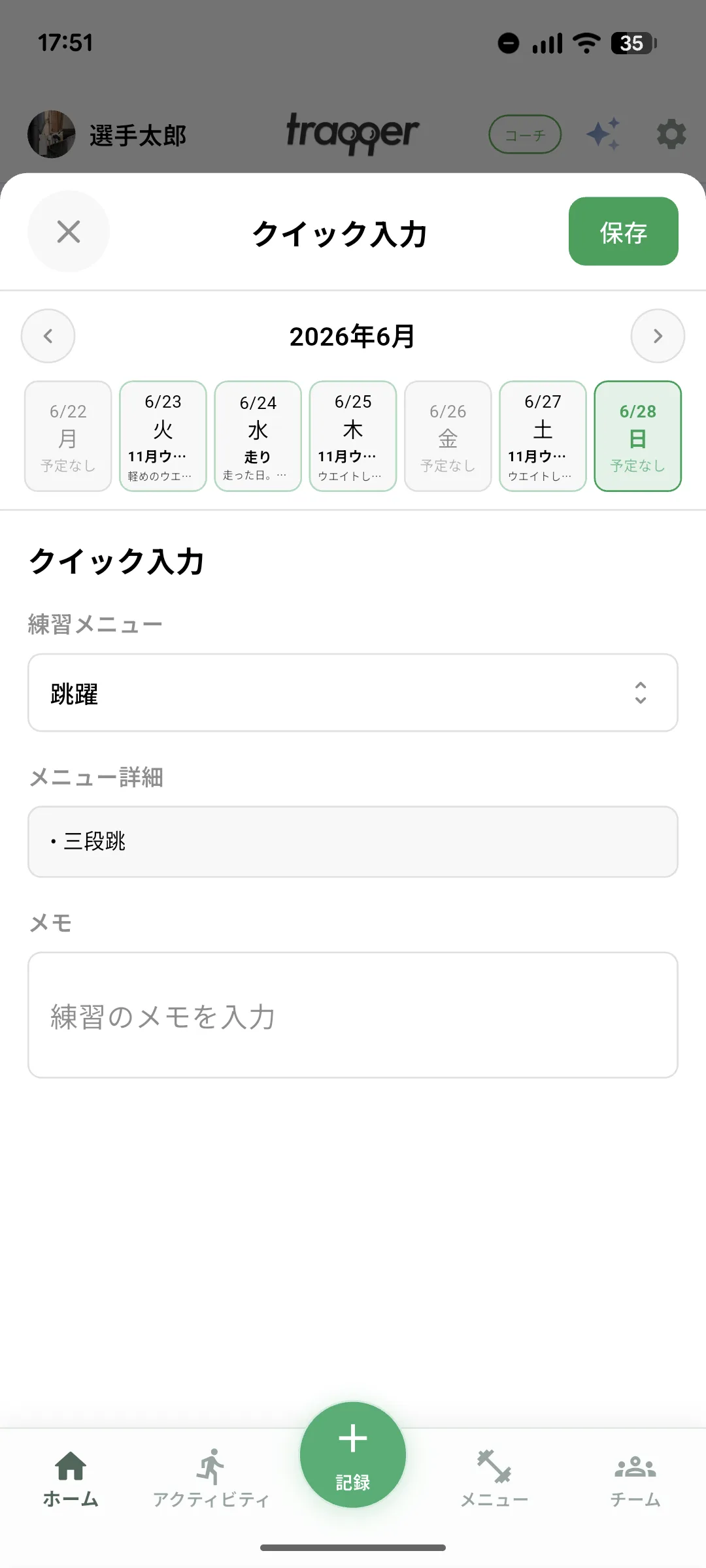
Future Dates Become Plans
Today and past dates create records. A future date creates a planned workout. The same lightweight entry point therefore supports both reviewing what happened and preparing what comes next.
Connect Planning and Recording
Plan, perform, and record can remain in one flow. A saved plan removes uncertainty when the day arrives, while the later record shows whether you followed or adjusted it.
Lower the Barrier First
If detailed journaling has been difficult to maintain, begin by saving only the workout menu through Quick Entry. Later, review the month in the calendar or add condition and notes through a full training record. The first goal is consistency. See also three ways to maintain a training journal.
Start Your Journey with traqqer
traqqer is an AI-powered app that helps you build better habits.
Download now and transform your daily routines for a better life.
