How to Use the traqqer Home Screen as Your Training Dashboard
Updated July 15, 2026
By the traqqer Editorial Team
The home screen is the first thing you see when you open traqqer. It is a dashboard that brings together your current status and the main paths into the app.
A Card-Based Dashboard
Rather than presenting one long list, the home screen uses cards. Each card is intended to communicate one message or provide one next action, so the current state is easier to understand at a glance.
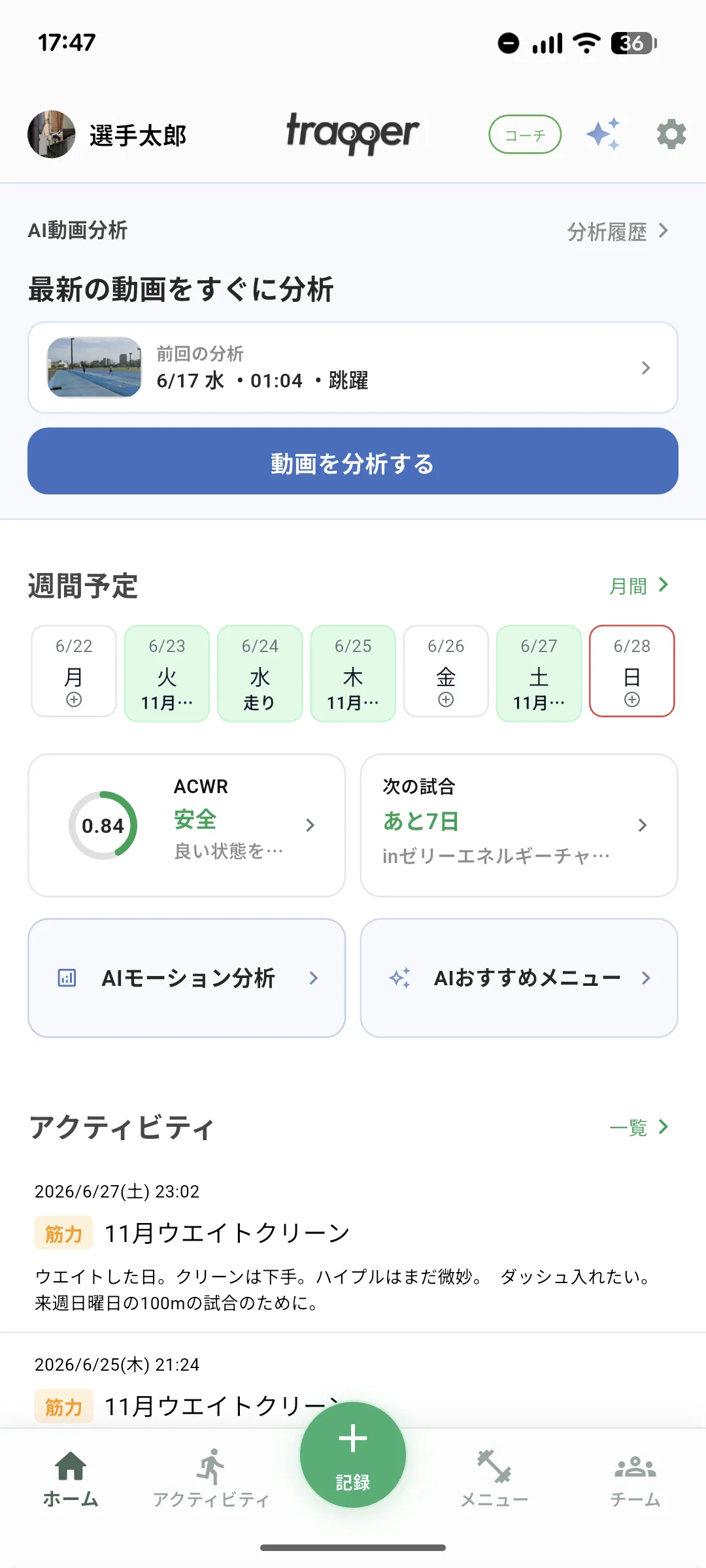
Countdown to the Next Competition
The dashboard shows the number of days until the next registered meet. Keeping the date visible makes it easier to recognize when an adjustment or taper should begin. See how to record competitions.
Shortcuts to Main Features
From home, you can move to training records, workout menus, the calendar, training statistics, competition records, and AI Chat. It acts as the hub for moving through the app without searching through multiple levels of navigation.
Team Updates
If you belong to a team, the home screen also surfaces new activity on the team board and indicates unread items. This helps athletes keep up with team announcements and teammates’ training.
Your Daily Starting Point
Open home, check the time until the next meet, and move to today’s task. After training, record the session. Periodically, use the calendar and statistics to review. The home screen connects that daily cycle of recording, reflection, and improvement.
Start Your Journey with traqqer
traqqer is an AI-powered app that helps you build better habits.
Download now and transform your daily routines for a better life.
