Manage Personal Bests and Your Athlete Profile in traqqer
Updated July 15, 2026
By the traqqer Editorial Team
Many athletes cannot immediately recall an exact personal best, especially when they compete in several events. traqqer’s profile brings basic athlete information and event-specific bests together in one place.
What to Add to Your Profile
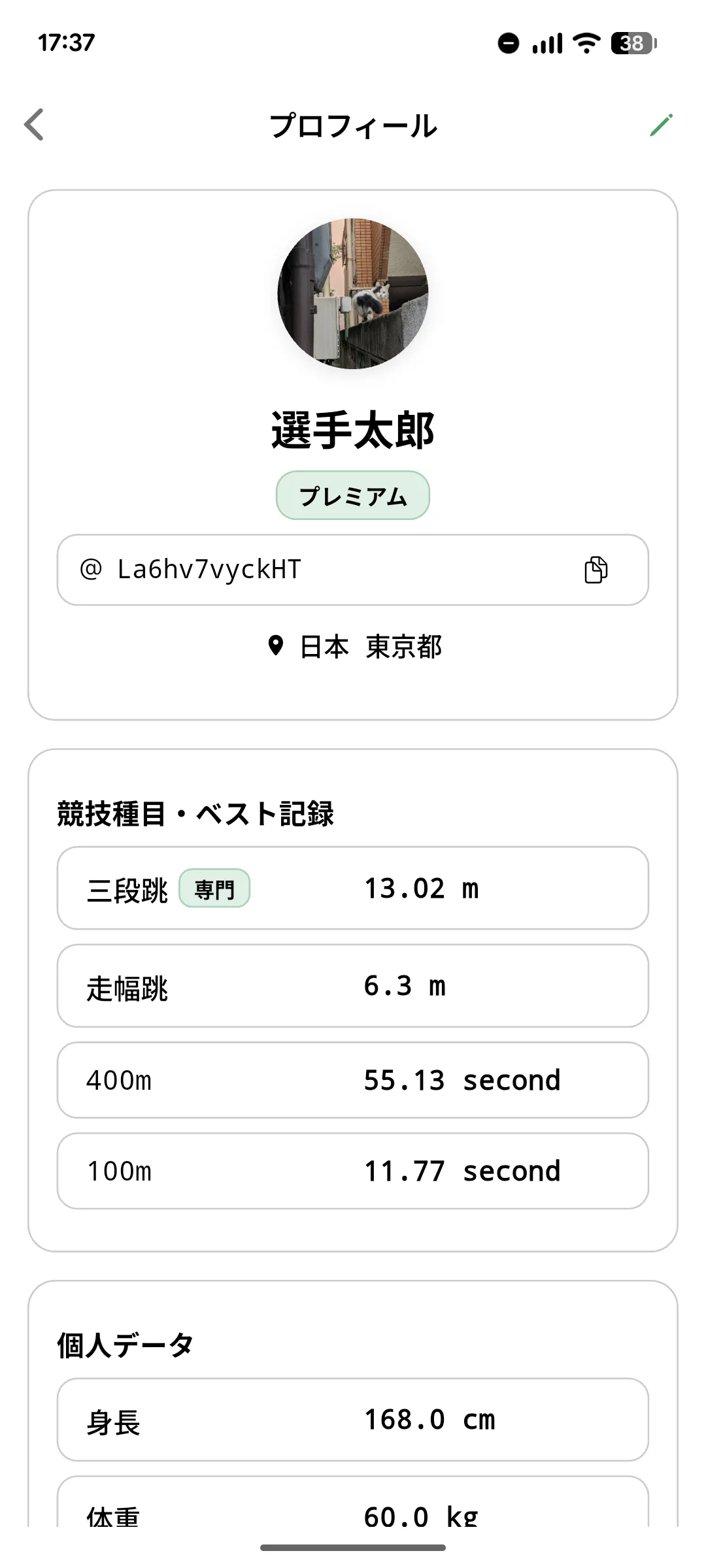
Along with your name, you can save primary events, height, weight, and date of birth. Height and weight are displayed with units, and adding your events makes the profile clearly reflect the kind of athlete you are.
Personal Bests by Event
The profile keeps a separate best for each event, such as 100 m, 200 m, or long jump. Events without a result remain visibly empty, which can also turn them into future targets. Seeing every current best together makes goal setting easier.
Update a Best from a Competition Result
Manual updates are easy to forget. When you save a competition result in traqqer, you can choose whether to reflect that result as a personal best. Keeping competition results up to date therefore keeps the profile current without entering the same number twice.
Account Information
The profile also displays the name and ID associated with the account, and the ID can be copied when needed. Premium status is shown for subscribed accounts.
A One-Page View of Your Current Position
Primary events, basic body data, and personal bests create a concise view of where you are now. Start by entering the events and results you already know. Future competition records can keep the list current as the season progresses.
Start Your Journey with traqqer
traqqer is an AI-powered app that helps you build better habits.
Download now and transform your daily routines for a better life.
